BloggingZoom: Fresh Look and Feel

Tuesday, January 29, 2008

BloggingZoom LogoI am a regular visitor and user of BloggingZoom since its launch in November 2007. But, due to my work load, I was not able to visit BZ for the past few days. When finally I visited BZ yesterday, it was a pleasant surprise. Now BloggingZoom looks trendy, modern and colourful. I really love the new look.

In case, if you have not heard about BZ yet, it is a place for bloggers to showcase their discussions. If you are familiar with Digg or Spotplex, it is similar and yet it has its own identity. I have written a few posts on BloggingZoom, which you can read for further information on BloggingZoom:


Vic, one of the founders of BloggingZoom, has clearly stated that the submissions should not be "Copy & Paste" from your blog. It should be unique content created for BZ. This is to prevent the search engines from slapping a penalty for duplicate content. So, please ensure that you type in at least 350 characters of unique content describing your post in BZ. I stress again, do not copy the content from your post and reproduce. Believe me, BZ is very useful and I am getting considerable amount of traffic through BZ.

Please subscribe to my feed if you like this post

Read more...

SaveBuckets: Find the product you want at the price you want

Wednesday, January 23, 2008


SaveBuckets
Savebuckets is an online price comparison site which allows you to compare prices on a wide range of products through hundreds of different shops. The ultimate aim of Savebuckets is to save you time and money.

Purchase from well-known shops
You may know some of the shops like Toys R Us, but some of the names may be alien to you. So, Savebuckets allows you to select the range of shops from which you would like to search for the product.

Fixing your budget
The best part of Savebuckets is that it allows you to set your budget for a particular product. For example, you found a product that is selling above your expectation. You have to just inform Savebuckets the maximum price you would like to pay alongwith your e-mail address. Savebuckets monitors the market on behalf of you and lets you know when the price falls below the maximum amount set by you. If the price stays above your value for two weeks, then they will send you an e-mail to let you know the current price.

Product Categories
The products are categorized for easy browsing. The categories include appliance, baby, health & beauty, entertainment, kitchen, office & computing and others. When you are browsing a particular category, the left sidebar lists down all the sub-categories that makes navigation very easy.

The instructions are very useful and informative. For example, when I browsed the MP3 player’s category under entertainment, it gave me suggestions on how to choose an MP3 player, types of MP3 player, how much music you can store, battery life and how to choose the accessories. Similar suggestions were noted for other categories too. The site layout is very neat and tidy. The white background is pleasing. The loading time is very fast.

If you would like to buy online, give Savebuckets a try.

Read more...

HitTail: Improve Your Search Engine Traffic

Tuesday, January 22, 2008

HitTail Logo

HitTail works on the concept of LongTail. LongTail is a term often used in statistics. The idea of longtail suggests that the total hits from your less popular keywords are more than the total hits from your top keywords. For example, my blog has other potential keywords than my top keywords like Blogger Widgets, BlogSpot Widgets, Widgets for Blogger or Blogger Hacks. If you can do something to improve the search engine ranking of those less popular keywords, then you can exploit the power of search engines.

How does it work?

HitTail Process
HitTail collects information about the search phrases used by your visitors. HitTail zooms right in on that data, showing you every search hit that has led to your site and then filters out the keywords. HitTail then extracts out underperforming terms as suggestions, so you can create new discussions with emphasis on these keywords. You may or may not choose to write on the suggested topic. The more you take action by writing about these potential topics, the more hits you get.

Outcome of using HitTail
The objective is to increase the ranking of your blog on search engines and subsequently get more organic traffic. HitTail identifies the exact terms to perk up your blog’s search engine rankings. These keywords are selected for their capacity to perform the most in the search engine rankings. When you start writing about these keywords, they add to the overall size and keyword diversity of your website.

The other advantage of using HitTail is that it serves as a list of topics for you to write. So,whenever you feel like there is nothing in the world to write about, look at the HitTail's suggestions. Then you will be able to write something that will bring you more organic traffic.

How to sign up?
HitTail service is free if your traffic volume is less than 100,000 page visits per month. To sign up, please click here. If your traffic is more than this level, then you need to subscribe to their paid service. To see the pricing, please click here.

Please subscribe to my feed if you like this post

Read more...

Google Page Rank Update: PR2 to PR4

Sunday, January 13, 2008

I am glad to inform you that this blog has moved up the ladder in the recent Google Page Rank update. Yes, the Page Rank of this blog has gone up from PR2 to PR4.

Here is the proof, thanks to PRchecker.info:


While the page rank of one of my other blogs went up from PR2 to PR3, the page rank of my second blog went down from PR2 to PR0. A new blog I launched last month is also given a Page Rank of 2. This blog has less than ten posts so far. Surprising one! To be honest, I still can not figure out the intricacies of the Google's Ranking system.

How about your blog? Did you notice any change in your Page Rank by Google?

Please subscribe to my feed if you like this post

Read more...

Region Free DVD Players

Thursday, January 10, 2008


What is a DVD Player?
DVD PlayerA DVD player is a device that can read Digital Versatile Discs (DVDs). It then reproduces the data in the form of an audio visual presentation on your TV screen.

What should you look for?
  • Your DVD player should be easy to use.

  • The front panel should be clearly labeled and easy to understand.

  • The player should have easy to navigate on-screen menus and features.
As a simple guide, you should be able to operate the player without the help of the instruction manual.

What is a region free DVD Player?
Certain DVDs could only be played in certain countries. DVD discs are encoded into six different regions as follows:

Region 1: United States and Canada
Region 2: Europe, Japan, Middle East, Egypt, South Africa, Greenland
Region 3: Taiwan, Korea, Philippines, Indonesia, Hong Kong
Region 4: Mexico, South America, Central America, Australia, New Zealand, Pacific Islands, Caribbean
Region 5: Russia, Eastern Europe, India, most of Africa, North Korea, Mongolia
Region 6: China

Movies from a certain region can play only on the particular region DVD player. This means Region 1 discs play only on Region 1 DVD players, Region 2 discs play only on Region 2 DVD players and so on. Movies from Region 1 WILL NOT play on DVD player from regions 2 to 6.

However, multi-region DVD players are now available that can play discs from all regions. A region free DVD player is a player that is capable of playing DVD discs from around the world. So, if you like to watch movies from all around the world, ensure that you purchase a region free DVD player.

Disc Formats
There are different disc formats The most common types are DVD-R, DVD+R, DVD-R, DVD-RW, CD-R, CD-RW, CD+R, CD+RW and CD-RAM. Please check that the DVD player is compatible with the types of disc that you’re most likely to use.


Read more...

Top Commentators Widget For Blogger

Saturday, January 5, 2008

You might have noticed the Top commentators widget in blogs powered by Wordpress. Sometimes, it is referred to as Best commentators widget. This post attempts to provide the same top commentators/ best commentators widget for Blogger/ Blogspot.


When I did search for the top commentators widget for Blogger, I could get very little on the net. I found one useful resource that seemed to implement the top commentators widget for Blogger. But, unfortunately, it is written in a foreign language; I believe it is in Russian language. Here is the blog, in case, you are interested: Best Commentators Widget for Blogger.

 

Yahoo PipesFor those who do not understand Russian language, here is the step-by-step tutorial.  To implement this, you will need a Yahoo account as we are going to use Yahoo! Pipes for implementing the widget. So, if you do not have an account with Yahoo, go to Yahoo and create an account first before reading further.


  1. Go to Yahoo! Pipes home page by clicking here: Yahoo! Pipes
  2. Click on the "Sign In" link at the top right corner of the page
  3. Login with your Yahoo user id and password.
  4. Go to my Yahoo! Pipe "Top Commentators Widget for Blogger" by clicking here: Top Commentators Pipe


    Top Commentators Pipe


  5. Once you are on the Top Commentators Pipe page, click on the "Clone" link to make a copy for your blog.
  6. Once a copy is made, you will see the link "Edit Source". Click this.
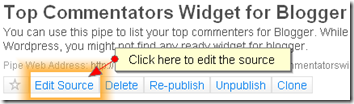
     

    Pipe Edit Source


  7. It will open the Pipes flow diagram for editing. At the top of the diagram, you will see a module called "Fetch Feed".


    Pipe Change Feed


  8. You will change the feed to point to your blog. In the URL box in the "Fetch Feed" module, delete my blog's feed and type the following: http://yourblog.blogspot.com/feeds/comments/default?max-results=1000. The "yourblog.blogspot.com" has to be replaced by your blog's URL.
  9. Once you have typed the address as shown above, click on the "Save" button at the top right.
  10. Click on the "Run Pipe ..." button at the top middle. This will open another window with the results of your pipe. If you have done everything right, it should display the list of your commentators with the number of comments in brackets.
  11. Click on the "More Options" button. This will open a drop-down list; click on the "Get as RSS" option.
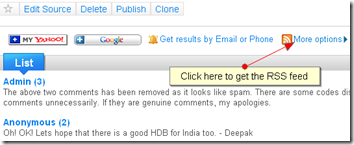
     

    Pipe RSS Feed 


  12. This will open your feed for the top commentators list. Copy the feed address from the browser's address field. This should look some thing like this:  http://pipes.yahoo.com/pipes/pipe.run?_id=1324dbad8c99bdc922ba75fee8dab73c&_render=rss
  13. Now, login to your Blogger account.
  14. Create a feed widget with the feed url you have just copied in step 12. If you are not sure how to create a feed widget, read my post on Recent Posts Widget for Blogger. You just have to follow the same steps as noted in that post. For the feed url, just use the one you have copied from the browser in step 12 here.
  15. Name the widget as "Top Commentators".

That's it. You have created the Top Commentators/ Best Commentators widget for Blogger. Unfortunately, at this stage, this does not provide any search engine gains to your commentator. The name is only linked to the latest comment by him/ her. As of now, use this feature. Soon, we will have a better widget that would give the link to the commentators's home page.


I know that this is a bit technical and you may encounter some problems along the way. Feel free to shoot your questions here. I will respond to them as quickly as possible. Please subscribe to my feed if you like this post.

Read more...

A Quick Round-up of December 2007

Wednesday, January 2, 2008

Round-up of December 2007December 2007 was a month when this blog achieved further heights. I could not actively blog as I would have liked to. This is reflected by the count of posts, only 15 last month. That is about 50% of what I was posting in the months of October and November 2007.

Irrespective of the number of posts, this month had good posts that drew some hot discussion. The one on BlogRush, Does BlogRush bring any traffic?, was discussed in detail and had a follow-up post Why my posts were not syndicated?. Following that, I did remove the BlogRush widget from this blog. I might use it in some of my other blogs, but I do not see much traffic to this blog from BlogRush.

I did a post on another useful service BloggingZoom, Does BloggingZoom bring traffic?. While I could not spend much time later this month on BZ, I had a good flow of traffic earlier this month.

As usual, I have written some posts on my favourite topic Blogger Hacks/ Widgets for Blogger:


The following is the current standing of this blog:

Marco’s Top Blogging Blogs List: #68 (November Rank: 66)
Google Page Rank: 2/10 (No change from last month)
Alexa Traffic Rank: 416,356 (November Rank: 664,445)
Technorati Rank: 132,066 (November Rank: 174,961)

My sincere thanks to all those regular readers and visitors for the support extended to this blog. I may not see any rise in the rankings in January and even there might be a drop due to less activity in December. But, I do hope to get back in action as soon as possible.

I wish all my readers a VERY HAPPY, PROSPEROUS and SUCCESSFUL New Year 2008.

Please subscribe to my feed if you like this post

Read more...

  © Free Blogger Templates Columnus by Ourblogtemplates.com 2008

Back to TOP