Spotplex: Can challenge Digg?

Thursday, November 29, 2007

Spotplex LogoSpotplex is an online congregation service that dynamically provides an instant ranking of web content. Site features such as user comments and sharing capabilities turn Spotplex into an interactive community.

Looks like another Digg?
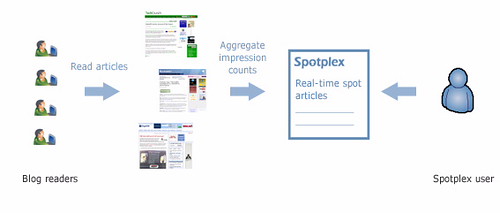
Initially, I thought this is similar to Digg or BloggingZoom as the front page looks similar. But, there is a major difference. Digg or BloggingZoom requires the visitors to vote for an article. The pages are ranked based on the number of diggs or zooms. With Spotplex, internet users are not required to change their behaviour to generate content rankings. Spotplex monitors each blog on its network and automatically ranks the pages based on the number of page impressions.
What is Spotplex?
How Spotplex works?
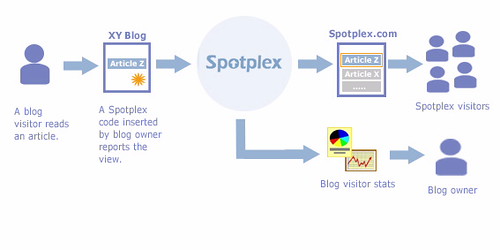
To join the Spotplex network, a blogger should insert a piece of code on to their blog. Whenever an article in the blog is read, the code reports Spotplex server that the article is read. The article shows up on Spotplex and the view counter reflects the change.
How Spotplex works?
Positives of Spotplex:
Spotplex Screenshot of Assess My Blog Page
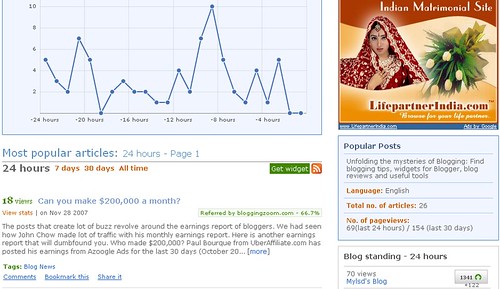
  1. The blog's specific page lists all the popular posts ranked according to the page views, the blog standing in the network and a graph that displays the dynamic change in page views. Each post, that has been ranked, also displays the major source of the traffic. This can be a quick and very useful information for bloggers.

  2. No need to login to the account every time. No user id and password. Anyone who types your blog url will be taken to the blog’s page.

  3. Basically, a blogger need not spend any time in promoting the blog. A one time installation of the HTML code is all that needed.

  4. Provides a nice widget for bloggers that can be integrated on to the blog to display the popular articles.

Negatives of Spotplex:
  1. Blogs with good traffic would have an edge over smaller blogs. To overcome this, Spotplex says it judges an article's popularity relative to the traffic that a site normally gets. But, I am not sure whether it works well to help smaller and medium sized blogs.

  2. Normally, blogging blogs receive traffic from other bloggers. This model might make it difficult to get traffic for blogs on blogging. There is no need to network, make friends or help other bloggers here.

Conclusion:
Overall, it is a good service that might help normal internet users. As far as bloggers are concerned, they could use the analytics support and use the popular posts widget to guide their readers. As it requires little time in investment, go ahead and install the code on your blog. You may get some benefit in the long run. Please click here to visit Spotplex.

Please subscribe to my feed if you like this post

Read more...

Can you make $200,000 a month?

Wednesday, November 28, 2007

The posts that create lot of buzz revolve around the earnings report of bloggers. We had seen how John Chow made lot of traffic with his monthly earnings report. Here is another earnings report that will dumbfound you.

UberAffiliate makes $200,000
Who made $200,000?
Paul Bourque from UberAffiliate.com has posted his earnings from Azoogle Ads for the last 30 days (October 20th to November 20th). Believe it or not, his screenshot shows an earning of $200,375.05 for the abovementioned period. John Chow wrote a post on this and the post drew lot of negative comments on the earnings report. It seems like many do not want to believe the report. The disbelief has something to do with Paul’s earlier action to Photoshop his Feedburner chicklet to show 87,864 readers on his blog.

Did he really make $200,000?
In a later post, Paul came back to state that he has spent as much as $118,747.09 on his Adwords campaign for the same period. So, he made it clear that $200k is not his profit, rather earnings. That should silence the critics a bit.

It does not matter whether you believe it or not, just take the positive from this report. Be inspired that a blogger can bag such huge amount. If he can do, you can do it too. Not today, not tomorrow but may be in the near future.

How much do you earn every month?

Please subscribe to my feed if you like this post

Read more...

Blogosphere This Week - Week No. 48/2007

Sunday, November 25, 2007

Blogosphere This Week - Week No. 48/2007

Here is this week's compilation of posts that I found useful, from the blogosphere. Please share your thoughts on the posts listed here. Do you have anything to add on, that you might have come across in the blogosphere? Feel free to add any interesting topic from your own blogs.

  1. The All-Time Best Blogging Articles - An Introduction! from SuperBloggingTips.com: This is a list of some good articles written on Content & Writing, Traffic generation & Exposure and Site development.


  2. 10 things to note when picking a new template for your blog from BloggingTips.com: I have changed the theme of this blog about two or three times. The selection of theme needs careful study. This post gives some guidelines in choosing the right template for your needs.


  3. What Should I Blog Tomorrow - Do You Feel The Stress? from BloggingTips.com: Most of the bloggers, including me, face this problem. It can be stressful. Blogging should be a hobby to me, but sometimes it is more stressful than my regular work. Here are some tips to overcome the stress. Please read the comments section too. There are some good strategies.


  4. 5 Things To Avoid While In Infancy of Blogging from BloggingTips.com: New bloggers get overwhelmed with a lot of new things as they progress slowly into blogging world. This post suggests ways to make the journey fruitful.


  5. How To Add ShareThis Widget In New Blogger Template from Walkernews.net: This post provides help on installing the ShareThis widget for Blogger. To successfully add in ShareThis JavaScript in New Blogger Template, you can follow this little HTML/ Blogger hack to tweak the ShareThis JavaScript snippet.

Do check next Monday for another list of insightful posts from the blogosphere. Please subscribe to my feed if you like this post

Read more...

Get emergency cash


We have discussed about payday loans earlier. Just to reiterate, payday loans or cash advance loans are short-term loans that help to borrow small amounts. The tenure of the loan is normally less than a month. The idea is to repay the loan by the time you receive your next pay check.

The payday loan have certain advantages: They are accessible to people with no credit, poor credit or bankruptcies. They can be done anonymously to the public and in the comfort of one’s home. The processing is normally considered faster than other credit procedures.

The key to obtaining payday loans is proper planning. You should not borrow more than the amount that you can manage with your next pay check. As a simple guide,

Amount borrowed < (Monthly salary – Essential monthly expenses)

It is believed that the interest rate is generally higher than other credit methods. So, you have to avoid having roll-over, the process of renewing the loan for the following month.


This post is brought to you by Cashadvance1500.com

Read more...

Meta Tags for Blogger: Part 4

Saturday, November 24, 2007

In this post, I will discuss how to include meta tags in your Blogger HTML code, with an illustrated example. This is the final post in the meta tags series. If you have not read my earlier posts, then you can find them at Meta Tags for Blogger: Part 1, Part 2 and Part 3.

How to install the meta tags in Blogger?
  1. Log in to your Blogger account.

  2. On your dashboard, click on the “Layout” link.

  3. Click on the “Edit HTML” tab.

  4. Look for the code portion <title><data:blog.pageTitle/></title>. You should be able to find this in the first few lines itself. If not, use ctrl+F to search

  5. Type in your description meta tag and keyword meta tag just below this line.

  6. Save your template.

Example
<title><data:blogPageTitle/></title>
<meta name=’description’ content=’Unfolding the mysteries of blogging: Find blogging tips, blog reviews, Blogger widgets and useful tools’/>
<meta name=’keywords’ content=’Online money, Blogging tips, Blog reviews’/>

Word of Caution
Use the meta tags judiciously. I am repeating this. If you use them improperly, it may backfire on you. It might destroy your search engine ranking.

Where to find more information?
I have to accept that I am not an SEO expert. If you still need further information, you can read the following. I find them very useful and practical posts on meta tags:

Please subscribe to my feed if you like this post

Read more...

Top 100 Blogging Blogs: My blog is among them

Friday, November 23, 2007

Few days ago, I wrote about the Top Blogging Blogs List created by MarcoRichter.net. Today, I am happy to announce that our blog is also featured in the top blogs list.

What is Top Blogging Blogs List?
This is a list that displays top blogs that blog about blogging itself. The selling point for Marco seems to be that he did not use Google Page Rank for ranking. Marco has mainly used the following factors to rank the blogs:

  • Number of incoming links,

  • Number of sites that provide the above incoming links and

  • Number of RSS subscribers.


Top Blogging Blogs List
What is the ranking of this blog?
Assess My Blog is currently ranked at No. 62 in the list. I feel really honoured to be featured in a list that boasts names like Darren Rowse, John Chow and Kevin Muldoon (These are the bloggers I regularly read for inspiration). The list may see some changes over the next few days and I may drop a few places. But, more importantly, my efforts are given the due recognition and I am happy about that.

Ranking of Assess My Blog
Does the list reflect truth?
Every ranking system has its own algorithm to rank blogs/ web sites. Some systems depend on the number of links, some depend on the traffic and probably you may see a ranking system based on the number of subscribers. So, there is nothing right or wrong here. Certainly, the list has no complaints at the top with ProBlogger, CopyBlogger and JohnChow occupying the top three slots.

Open Questions to Marco
While I am happy with the list, I have some questions to Marco. Hope he will respond. His response could help others to understand the rationale of his ranking system.

  1. Why did you select the above three factors for determining the ranking?

  2. Why the blog traffic is not included for ranking? Would the inclusion of Alexa rank as the fourth factor be useful?

  3. Why did you select the number of links as your primary key for sorting the blogs?

  4. How often the list is going to be updated? Is it a dynamic list or updated at regular intervals?

  5. Where do you get the data to update the list? From Technorati and Feedburner?

I take this opportunity to thank Marco for including my blog in the list. To see the complete list, please click here. Please subscribe to my feed if you like this post

Read more...

Meta Tags for Blogger: Part 3

If you would like to know more about meta tags, then read my other posts Meta Tags for Blogger: Part 1 and Meta Tags for Blogger: Part 2.

Description meta tag
The description attribute provides a concise explanation of a web page's content. This allows the webpage authors to give a more meaningful description instead of the search engine’s automatically created description based on the page content. The description will be displayed along with the title of your page in an index. A carefully crafted description can improve click-through rates.

It should look something like this:
<META name=’description’ content=’a description of your page’>

In fact, you need not use the description meta tag in Blogger. Instead, you can use the description field in your header page element. It serves similar purpose in search engine displays.

Where should I place the meta tags?
META tags should be placed in the head section of the HTML document, between the <head> and </head> tags.

I will continue further in my next post, Part 4 of the series. Please subscribe to my feed if you like this post

Read more...

My Blog is Ranked #1338, Really!

Thursday, November 22, 2007

Yes, that’s not just title bait. My blog’s RealRank is 1338.

Izea have released their ranking system called RealRank. In the first update, I found my blog’s ranking as stated above. I know that it’s going to be there only for a shorter period of time, before other bloggers join the pool. I believe this blog had been ranked since it took part in the beta testing program.

RealRank

What is RealRank?
It is another form of blog ranking, similar to the well known Google PageRank, Alexa Traffic Rank or Technorati Rank. The difference lies in the way the rank is computed. Google gives much importance to the number of links and the quality of links. Alexa considers the number of visitors and page visits. Technorati considers purely the number of links. RealRank tries to get all these factors into account at a certain weightage and compute the final rank.

How is RealRank computed?
RealRank uses the count of unique visitors, incoming links and page views in a mathematical equation to come up with a score for your site. The resulting score is also weighted in some areas. 70% of the score relates to unique visitors, 20% relates to inbound links and 10% to page views. The formula also takes into account those activities that artificially boost traffic so that they don't have a big effect on the rank.

Why RealRank?
Izea claims that Google has started to penalize the PageRank for those bloggers associated with sponsored reviews. So, Izea has invented RealRank in an effort to protect these bloggers. In the future, it is expected that advertisers will choose bloggers based on RealRank rather than PageRank.

How to get a RealRank?
If you already have installed the PPP Tools, then you don't need to do anything at all. If not, go to the PPP Tools page in PayPerPost.com, get the Javascript snippet and follow the instructions to install it on your blog.

Where can I get More Information?
You can visit the Izea blog and read the post What is Izea RealRank?. I am not sure how useful RealRank is going to be. Let us see how it evolves over the next few weeks.

Please subscribe to my feed if you like this post

Read more...

A Blog Achievement To Celebrate

Wednesday, November 21, 2007

100 Posts: A Blog Achievement

Assess My Blog has just reached another milestone. Yes, we have completed 100 posts, including this one. Not a great achievement, but I wanted to celebrate this to commemorate the tougher path encountered so far.

While this is not my first blog, this is certainly my best blog so far. And, this is my first blog to reach 100 posts level. My first 50 posts on this blog took about 5 months. But, the second 50 posts took less than 2 months. Yes, I am able to maintain an average of about one post per day.

What did this blog achieve in addition to just the number of posts itself? There is a bit of achievement to share with you:

  1. Achieved a Google Page Rank of 2

  2. Currently ranked at 224,227 by Technorati

  3. Currently ranked by Alexa at 715,170

  4. Have about 18 subscribers to this blog (Of course, this number varies slightly)
My heartfelt thanks to all the readers who have supported me so far. I need your support to reach the next level!

Please subscribe to my feed if you like this post

Read more...

How Addicted to Blogging Are You?

Tuesday, November 20, 2007

OK, its time to have some fun. I think we had enough of serious stuff for quite some time. So, I took sometime off to have a test that posts a series of questions to you. At the end of the 14 questions, it tells you how addicted to blogging you are.

I took the test and ended with a 68% addiction. Considering that I am just doing part-time blogging, thats really on the high side. I too personally feel that I am addicted to blogging. I wake up with blogging ideas, thoughts run through my mind while bathing and I cannot sleep without posting for the day.


How do you feel? Want to see how addicted you are? Take the How Addicted to Blogging Are You? test here. Please subscribe to my feed if you like this post.

Read more...

Meta Tags for Blogger: Part 2

If you would like to know what are meta tags, then read my earlier post Meta Tags for Blogger: Part 1.

What happened to Meta Tags?
In the ealy days, search engines were reliant mainly on meta data. Recognizing the significance of meta data, the webmasters exploited the technique to rank high in the search engines. Keyword stuffing and manipulation of meta elements to outsmart the search engine algorithms slowly led to the downfall of meta data. Search engine providers realized that information stored in meta elements, were used to draw visitors into spam sites. Search engine robots have since become more sophisticated. And, meta elements have significantly less effect on search engine results today.

Keywords meta tag
It is understood that still some search engines use keywords meta tag. Choose whatever keywords you think are appropriate. But, avoid spamming with keywords. If you are not going to write anything about a particular keyword in your blog, then just including it in the meta tag does not help. On the other side, repeating a particular word too often in the keywords list might adversely affect your ranking. So, be careful in using the keywords meta tag.

The HTML code for keywords meta tag should look something like this:
<META name=’keywords’ content='keyword1, keyword2, keyword3, keyword4’>

I will continue further in my next post, Part 3 of the series. Please subscribe to my feed if you like this post

Read more...

Blogosphere This Week - Week No. 47/2007

Sunday, November 18, 2007

Here is this week's compilation of posts that I found useful, from the blogosphere. Please share your thoughts on the posts listed here. Do you have anything to add on, that you might have come across in the blogosphere? Feel free to add any interesting topic from your own blogs.

  1. Google Goes After PayPerPost from JohnChow.com: This is really bad news for small to medium sized bloggers. Most of the bloggers make some money with sponsored reviews. If Google is going to get tough measures on such blogs, where do we go?


  2. Top Blogs About Blogging Top-List Launched from MarcoRichter.net: Another list of top blogs, this time about blogging. The top three spots are occupied by ProBlogger.net, CopyBlogger.com and JohnChow.com. If your blog is on blogging, you can request to add your blog here.


  3. What Causes Subscribers to Read Your Blog’s Feed? from DailyBlogTips.com: Have you ever thought about what makes your feed appealing enough to your subscribers that it actually gets read? In this post, you can find the various factors that influence the readers.


  4. Why You Should Be Careful with Ads on Your Site from DailyBlogTips.com: Advertisements are powerful ways to make some money from your blog. If you do not use them properly, you might lose your visitors that might in turn affect your earnings. This post tells us why we should not be greedy with advertisements.


  5. CSS Style Generator from DailyBlogTips.com: Do you play with Cascading Style Sheets (CSS)? Do you change your stylesheets often? This post introduces a very useful tool that you can try hands on. It can also be used as an effective learning tool.


  6. How NOT To Monetize Your Blog from BloggingTips.com: Blogs can be a good money maker if monetized properly. This post explains how to monetize in such a way that doesn’t disturb your reader.


  7. Blogger Random Posts Widget from Indyankk.blogspot.com: Random posts widget for Blogger is an useful way to give life to your older posts. I would say this is another good blogger hack. This post gives you an easy way to install the random posts widget to your blog and how to customize the widget.
Do check next Monday for another list of insightful posts from the blogosphere. Please subscribe to my feed if you like this post

Read more...

How to Improve Your Earnings with PayPerPost?

Friday, November 16, 2007

PayPerPostIf you have not signed up with PayPerPost yet, please read my earlier post 5 things to note before signing up with PayPerPost.

If you have signed already, then the following tips should help you to improve your earnings with PayPerPost:


  • Blogs with better Google PageRank and Alexa Ranking gets the highly paid opportunities. So, work towards improving your Google PR and Alexa traffic rank. In simple terms, get more inbound links and get more visitors. Engage your visitors for a longer time on your blog and ensure they at least visit few pages.


  • Even if you have a good Page Rank, if your blog is on a free domain like BlogSpot you will be missing out lot of opportunities. If possible, get your own domain. I notice that most of the advertisers impose a restriction that the blogs should have their own domain.


  • You have to check the PPP site regularly for new opportunities. Good opportunities disappear at a rapid pace. You have about 6 hours to write about the opportunity you have reserved.


  • Use their affiliate programs to promote PPP. They have a comprehensive set of tools to implement like sign-up forms, get paid to review post button and the referral images.

If you have any other strategy to improve the earnings with PPP, please share with us here for the benefit of others. Please subscribe to my feed if you like this post

<< 5 things to note before signing up with PayPerPost
<< 3 things to note after signing up with PayPerPost

Read more...

Do not wait until your Pay day


There seems to be a sudden buzz about payday loans that are also known as cash advance loans or bad credit loans. Payday Loan, in simple terms, is a short-term loan that helps you to cover emergency needs that cannot wait until your next payday.

Initially, the concept of payday loans came around to help those who have extremely limited options to borrow money. Lenders say these loans are often the only option available to consumers with bad credit or who cannot get a bank loan, credit card, or other lower-interest alternatives. If you do not have a bad credit, then bank loans and credit cards are strong alternatives but both are certain to involve credit checks and a lengthy approval process. Unfortunately not everyone can afford to wait for emergency funds and not everyone can boast a flawless credit history.

Payday Loans ABC is the solution for anyone in need of a quick, easy, confidential way of emergency cash. You can also find daily news articles, in their web site, covering the payday loan industry and provide links to the web's top resources for payday lending information.

You have to accept that payday loans certainly charge higher interest rate, compared to other forms of credit. But the higher interest rate comes with the convenience of a fax less payday loan. If you decide to use a payday loan, borrow only as much as you can afford to pay with your next paycheck. Think twice and plan your borrowing to avoid getting trapped in a cycle of debt.


This post is brought to you by PayDay Loans ABC

Read more...

Meta tags for Blogger: Part 1

Thursday, November 15, 2007

I had been requested to write about meta tags by one of our readers. He did put up the suggestion a few times. Here, I am going to write a series of posts on meta tags.

What are Meta Tags?
Meta tags are pieces of code that reside inside the HTML document of a web page. They are often not directly visible to the visitor. Meta tags provide relevant information about a blog or webpage, to help search engines categorize them.

Initially, I am a bit reluctant to write about meta tags. The simple reason is that meta tags are not popular nowadays. And if you do not use them properly, it may backfire on your search engine rankings, especially Google.

On the positive side, few search engines still give importance to meta tags. Use them properly and you may reap the benefits. Yahoo provides the following tips to improve your ranking in their search:
  • Use a "description" meta-tag and write your description accurately and carefully. After the title, the description is the most important draw for users. Make sure the document title and description attract the interest of the user but also fit the content on your site.


  • Use a "keyword" meta-tag to list key words for the document. Use a distinct list of keywords that relate to the specific page on your site instead of using one broad set of keywords for every page.
I will soon be posting Meta tags: Part 2, where I will explain about meta tags in much more detail. Please subscribe to my feed if you like this post

Read more...

Meet Financial Emergencies with Confidence

Wednesday, November 14, 2007


You might have felt one day or the other "I just need enough cash to tide me over until payday." If you concur, then payday loan is tailored just for you. Payday Loans are also sometimes referred as cash advance loans, check advance loans, or deferred deposit check loans.

What is a payday loan?
A payday loan is a small short-term loan that provides a quick and easy way to bridge your cash needs between pay days without a credit check. Typical loan amounts range from $100 up to $1,500 on a two-week term. The cash advance can help you to cover for emergencies, unexpected bills and other unforeseen expenses until your next paycheck.

What should you do?
You have to shop carefully when you need credit. Compare offers. Look for the credit offer with the lowest Annual Percentage Rate (APR). APR is the total cost of credit to the consumer, expressed as an annual percentage of the amount of credit granted. APR is intended to make it easier to compare lenders and loan options. Please ensure to compare the APR and the finance charge (which includes loan fees, interest and other types of credit costs) of offers to get the lowest cost.

Who can help you?
PaydayLoanQuotes.com is a FREE comparison service where you can request quotes from a network of licensed lenders. With the information you provide them, they will attempt to match you with a lender. While a perfect match is not guaranteed, they compare offers from various lenders to find the lowest rate available for your financial profile.

Note of caution
Borrow only as much as you can afford to pay with your next paycheck and still have enough to make it to the next payday.


This post is brought to you by PayDayLoanQuotes.com

Read more...

3 things to note after signing up with PayPerPost

Tuesday, November 13, 2007

PayPerPostIf you have not signed up with PayPerPost yet, please read my earlier post 5 things to note before signing up with PayPerPost.

If you have signed already, then please take note of the following:

  1. Please be patient with PPP. They might take longer than the duration indicated on their website.


  2. If they reject your blog, review the stated reasons. Do take the rejection positively. For your information, my first blog has been rejected thrice before finally getting the approval. Even my second blog was rejected once.


  3. Implement the changes suggested and resubmit your blog for approval. PPP is fairly systematic in their review process. If you address their concerns properly, your blog will be approved.

What is your experience after signing up with PayPerPost? Please share with us here for the benefit of others. Please subscribe to my feed if you like this post

<< 5 things to note before signing up with PayPerPost

Read more...

Blogosphere This Week - Week No. 46/2007

Monday, November 12, 2007

I have compiled a list of posts that I found useful, from the blogosphere over the last week. Please read on and share your thoughts on the posts listed here. Do you have anything to add on, that you might have come across in the blogosphere? Feel free to add any interesting topic from your own blogs (No spam, please).

  1. Finding Your Niche from SEOmoz: The post gets us thinking about how we select the niches that we’re in and whether we’re in the right niche for us.


  2. Tips To Focus on the Writing from Blog Herald: While we hear too much about SEO, linking and page ranking, here is a good post that tells us to focus on the writing.


  3. Use Feedburner Statistics to Interpret Reader Habits from ProBlogger.net: This post explains how your FeedBurner stats can tell stories about your readers’ habits.


  4. Five Easy Steps to Editing Your Own Work from CopyBlogger.com: Have you ever spent time in editing your own work? Editing is a skill that can take years to perfect. But if you follow the recommendations in this post, you’ll greatly improve your writing.


  5. Self Branding - Moving Beyond the Niche to Generate Income as a Blogger from ProBlogger.net: This post explains the importance of self-branding and how you choose to present yourself and your content. This will determine whether you will get loyal readers, which in turn can lead to into increased revenues.


  6. Are You Writing With Clarity? from CopyBlogger.com: This post outlines a few simple things you can do to make your writing easier to understand.


  7. How I Gain 4,691 RSS Reader in 1 month from JohnChow.com: You might not have forgotten the subscribers contest between JohnChow and ShoeMoney recently. JohnChow explains how he managed to get subscribers during this contest.


  8. Saturday Ramblings: Resources for Blogger Templates and Widgets from Investmentbankeronlife.blogspot.com: This post lists the various resources available freely for Blogger templates, Blogger hacks and widgets for Blogger.


  9. Learning CSS from BloggingTips.com: Learning the technologies is a key to improving your blogging. Here is a post that gives you some great links to learn Cascading Style Sheets (CSS).


  10. 5 ‘Less Used’ Ways To Get New Subscribers from BloggingTips.com: Looking to get some more subscribers for your blog? Read this post.
Do check next Monday for another list of insightful posts from the blogosphere. Please subscribe to my feed if you like this post

Read more...

Inbound and Outbound links

Recently, one of our readers wanted to know what does an inbound link means. So, here is a post that shares what I know. Please feel free to add your view or any other links that you may find useful to the topic.

What is an inbound link?
The answer is simple; any link on some other blog/ web site that points to your blog is an inbound link to your blog. For example, if I include a link to your blog on my blogroll, then I have given you an inbound link.

What is an outbound link?
Consider a link provided on your sidebar to another blog, say, abc.xyz.com. The link on your blog is considered as an outbound link for your blog. The same link is considered as an inbound link to abc.xyz.com.

Why links are important?
The amount of quality inbound links to your site is one of the most important criteria used by search engines to rank your pages. Note the word ‘quality’ inbound links. All links are not equal to search engines. Some links are more important and will have more value than others. Links from highly ranked sites will be given more weightage when computing the rank of your blog.

How many inbound links do I have?
You can use search engines to find out how many inbound links you have. For example, go to Google.com and enter link:yoururl.com. The search will display a list of all websites that contain a link to your site. Google only returns a selection of inbound links; it doesn't show all links to your site.

Similarly, you can search for inbound links at Yahoo. Go to Yahoo! Site Explorer, type your url and click the button "Explore URL". It will display a list of inbound links to your site as seen by Yahoo.

Please subscribe to my feed if you like this post

Read more...

5 things to note before signing up with PayPerPost

Sunday, November 11, 2007

PayPerPostIf you would like to find out why PayPerPost is good, please read my earlier post Money Makers For Me: PayPerPost.

Most of my affiliates have problem in getting their blog approved, since they did not stick to the guidelines provided by PPP. I am going to list it down here. If you follow these, the chances are high that your blog will be approved. It is fairly EASY to get the approval.

  1. Please ensure that your blog is at least 90 days old. Your blog will not be approved if it is less than 90 days old, unless you have huge traffic to your blog.


  2. Please ensure that you post regularly. You cannot have a break of more than 30 days between any two consecutive posts.


  3. Submitted blogs must have at least 20 written posts in the past 90 days.


  4. Do not curtail your posts on the home page. Some blogs prefer to provide just a few lines of each post on the home page and then provide a ‘Read More …’ link to view the complete post. PPP do not accept this. The entire posts must be visible on the page with the posts themselves as well as the main page of your blog.


  5. PPP is having a promotion which pays $20 for your first post on the given opportunity. I am not sure how long this promotion will stay. Please confirm at the PPP site before signing up.

    Alternatively, PPP offers the Get Paid to Review My Post promotion. If you sign up as a referral, you get $7.50 and your referrer gets $7.50. Sign up under this program as this will get some head-start for you and you have also done a favour to the blogger who tipped you on PPP.

I am not a PPP administrator. So, I am sharing only my own experience with PPP. If PPP has imposed any other requirements on your blog, please share with us here for the benefit of others. Please subscribe to my feed if you like this post
<< MoneyMakers For Me: PayPerPost

Read more...

A Refreshing New Look to your Garage

Saturday, November 10, 2007


Garage FlooringWhen someone enters your house or garage, the floor tiles and your wall painting gives them a warm welcome. Just imagine you have a cracked, chipped or stained garage floor. Would you bring in your guest with confidence? Probably not. So, what is the solution? Do you have to live with it, trying to hide it every time?

Garage flooring tiles can be used to cover your cracked, and oil stained concrete garage floors. You will get a whole new look with any pattern you can imagine. These garage floors provide a cost effective alternative to epoxy or other garage floor coatings. Garage flooring tiles last longer and are easy to install in your garage.

This post is brought to you by CarGuyGarage.com

Read more...

Money Makers for Me: PayPerPost

Friday, November 9, 2007

PayPerPost is one of the services that help me in monetizing this blog. If you are a blogger, then PPP is one of the best options for you to make money online. In fact, PPP top the list of my money makers. And, PPP top my affiliate programs too.

Why PPP is good?
  1. PPP does not have any great requirements to sign up.

  2. PPP provides bloggers with much more opportunities compared to other similar services.

  3. Their approval process is transparent. If they reject your blog, they explain the reason and you get a chance to resubmit.

  4. Provides good affiliate programs.

  5. Payment is on schedule. You get the payment via PayPal immediately upon 30 days after the submission of your post
If you are interested in PayPerPost, click here to visit their sign up page. I will be posting a series of posts on PayPerPost. Read them too if you are not convinced yet.

Would you like to add any other point to stress that PPP is good? Or would you like to oppose my view that PPP is good? Please feel free to add your comments here. Please subscribe to my feed if you like this post

Read more...

5 simple steps to a stronger password

Wednesday, November 7, 2007

Nowadays, we are signing up for so many services online. Every sign-up needs a user-id and password to be remembered. Please ensure that you have a strong password that is difficult to predict. When you have a strong password, it gets difficult to remember and also to type. So, you need a trade-off between usability and security. Here are some suggestions to have a strong password.

  1. A mix of alphabets and numeric characters gives you a strong password.
    For example, let me say my password is "password". This is very easy to predict. How about "pa55w0rd"? It gets difficult to predict, but easy to remember.

    How about "goodpassword" compared with "g00dp455w0rd"? I have replaced the alphabets "o, a, s" by numbers "0, 4, 5". Be innovative and you will get a very strong password that is easy to remember.

  2. Choose your own phrase and pick the first characters to form a password.
    For example, I still remember my Engineering formula M/I = F/Y = E/R as "May I Fool You Elizabeth Rani?” A difficult formula becomes very easy to recall even after many years. Using the same concept, you can form strong passwords. A phrase "I love my wife and children" can be used to form "ilmwac".

  3. Mix up capitalized letters.
    For example, the password in step 2 "ilmwac" can be made stronger to "iLmWaC".

  4. Do not use any part of your user-id as password.
    For example, if your user-id is "myname", do not try to use a password like "namemy" or similar.

  5. Avoid having number sequences or alphabet sequences.
    For example, do not have a password like "abcdef" or "123456".

Remember, your passwords are only for your own use. Probably, you can write it on a piece of paper and keep it locked somewhere in your home. But, do not stick it on to your monitor. I have seen many people do this for convenience. Never do that.

Internet secUrity cannot be achieved without U. The above are some simple strategies to protect your information. Do you have any other secret? Share with us. Please subscribe to my feed if you like this post

Read more...

Hemorrhoids: Treatment and Relief

Tuesday, November 6, 2007


Do you buy products online? How do you make a decision to buy a particular product? Whenever I like to buy a product or subscribe to a service online, the first thing I do is to look for reviews online. I will go through as many reviews as possible until I am convinced.

TrustSource understands such a trend in the online buying industry and has implemented a system to rank products. The products listed on TrustSource have been evaluated and compared for the claims they make. Once this process is finalized they rank the products for the consumer. They also provide you with customer reviews and ranking.

I had a look at their hemorrhoids page. I like the simplicity of the site and clutter-free pages. They have provided a home page listing all the products under this category. The next page shows you the rationale behind the ranking system. The final page is what impressed me much. It gave me a complete insight about hemorrhoids, the signs and symptoms, sources and prevention. To buy products that give all around benefits and the best over all value, visit TrustSouce.Org.

This post is brought to you by TrustSource.Org

Read more...

Blogosphere This Week - Week No. 45/2007

Sunday, November 4, 2007

This week saw the launch of another free service for bloggers to bring in more traffic, BloggingZoom. I have compiled a list of posts that I found useful, from the blogosphere over the last week. Please read on and share your thoughts on the posts listed here. Do you have anything to add on, that you might have come across in the blogosphere? Feel free to add any interesting topic from your own blogs (No spam, please).

  1. How I Lost 4,993 RSS Subscribers Overnight from JohnChow dot com: John Chow is good at catchy titles. Read why he has lost so many subscribers in a single day. In fact, many other bloggers have reported a sudden drop in their feedburner count.


  2. How To Overcome Blog Loneliness from JohnChow dot com: If you are a full-time blogger, then networking is very important to keep you going. John Chow gives some tips to full-time bloggers how to sustain the interest in the profession.


  3. John Chow dot com October 2007 Income Report from JohnChow dot com: The monthly income report is one of the most popular posts from John Chow. In the latest report, he declares a monthly income of $23,448.59. When can I make at least 1% of that value?


  4. 5 Simple Steps to kickstarting a Blog from JohnChow dot com: Lars-Christian Simonsen shares the success story which brought him 400 visitors a day up from 30 - 50 visitors a day, in three weeks.


  5. Why Not Spend An Hour Making a Quick Buck? from BloggingTips.com: Patric Herber shares his success with affiliate marketing. A good post to read if you are interested in making some money with affiliate marketing.


  6. Use your old posts to create new content from BloggingTips.com: If you have a question on your mind whether to delete some of the obsolete posts, read how you can play with your old posts.


  7. The power of Commenting on blogs from ProBlogger.net: Darren provides a proof of how effective this simple startegy can work for you. Do comment on this blog. You may get some visitors, who knows?.


  8. 6 Ways to get new content ideas from BloggingTips.com: Running out of ideas to start your next discussion? RamKarthik has some tips for you.


  9. Tools and Resources for Keyword Research from DailyBlogTips.com: Keyword research is an important activity for bloggers. If you are not sure on what tools to use, read this post.


  10. Widgetbox widgets for blogger from BloggerTemplates: Widgets have become an integral part of blogging, due to the ease of installation and maintenance. This site introduces a good source for interesting widgets for blogger.
Do check next Monday for another list of insightful posts from the blogosphere. Please subscribe to my feed if you like this post

Read more...

Build your traffic with BloggingZoom

Friday, November 2, 2007

In my opinion, posts on building blog traffic has been one of the most read in the blogging industry. Every blogger, irrespective of new or pro, wants to improve their traffic. A blogger with 10 visits targets 100 visits; one with 100 visits targets 1000 visits and so on. So, any service that promises to bring in more traffic is going to be an instant hit. We had seen this happen to BlogRush in the last two months. Now, it is the turn of BloggingZoom.

BloggingZoom
Launched by Court and Vic only yesterday, bloggers are already zooming in on to BloggingZoom. It is believed that the first day of launch itself has attracted about 8500 page views. In fact, I did not see much advertisement or buzz about this service before the launch. Few days ago, I just read a post on CourtneyTuttle.com that he is going to launch a traffic building service.

What is BloggingZoom?
BZ is a social hub where bloggers can share ideas, learn to better them, and receive deserved, huge bursts of traffic to their quality content. It is a FREE service.

How it works?
Upon first glance, you will notice that the front page of BloggingZoom looks and acts similar to Digg. I feel that the concept is also similar to Digg. If you find some great content, then you share it. If anyone else finds it interesting too, they will vote for it. The post with high number of votes moves up the ladder and will be visible to millions of visitors. Then, is BZ going to be Digg No. 2? The minds behind the idea of BZ say no.

Key factors that make BZ different from others
(Extract from CourtneyTuttle.com)

  • Bloggers are not penalized for submitting their own content.
    In fact they are encouraged to submit all of their content. BZ allows you to add as much of your content as you want to a site that will get incredible amounts of traffic. Users will still vote for, or zoom, content and with enough zooms your content will be published front page to maximize traffic to your blog.


  • If you’re not a blog, you’re out.
    There will be no competition between bloggers and huge news sites that already dominate search engine results and are indexed 100 times per day by Google. What happens if CNN submits an article to Blogging Zoom? Buried hahahahaha.


  • We will use our SEO expertise to expose your content to search engines.
    This is the key factor that takes BZ 10 levels higher than anything else out there. The only thing even close to BZ in this aspect is Squidoo, but Squidoo doesn’t give you the potential to receive massive traffic bursts that can generate hundreds of links and thousands of visitors.


  • Blog search engines like Google Blog Search and Technorati index spam like it’s premium content.
    Hopefully everyone is as tired as I am of competing with spam, because it’s a freaking joke. Since BZ is driven by bloggers, spammers will be reported, their work deleted, and their accounts banned.

So, there are obvious reasons to join the community if you are a blogger. If you are interested, please register at BloggingZoom.

Please subscribe to my feed if you like this post

Read more...

Where do I get the traffic from?

I did a quick study of my last month statistics, using Google Analytics. For the first few days of the month, Google Anlaytics did not record any data from my site due to some glitch. The general trend should be similar and the few days missing data should not affect the monthly statistics too much.

Traffic SourcesI had some interesting information to share with you. The traffic sources to my site are classified into three broad categories; direct traffic, search engines and referring sites. The pie chart below shows the distribution across the three categories. I am not paying attention to the direct traffic. I am much more interested in the other two traffic sources.

Traffic from Referring sites:
About 65% of the traffic came from referring sites. That’s good and reiterates my earlier discussion to link to other blogs without hesitation. This is an excellent strategy. Ensure that you link to quality posts on SMBs, Small to Medium sized Blogs (Why not consider linking to some of my posts?). This strategy might not work well if you are linking to popular blogs. As they may have so many reactions in the blogosphere, they may not care to visit you. But, authors of SMBs will always take a look at your site to understand why you have linked them. This might bring traffic to both blogs.

Traffic from Search Engines:
About 26% of the traffic came from search engines. I feel it is good again. The distribution is completely lopsided towards Google. Out of the 244 visits from search engines, Google contributed a whopping 240. The remaining 4 visits came from AOL, Live, MSN and Yahoo with just one contribution from each of them. The keywords that led traffic to my site mainly were related to Blogger like Blogger hacks, widgets for Blogger, related posts, recent posts, recent comments and so on. Either this goes to show that Google is the most widely used search engine or other engines have not yet noted the presence of my blog.

Where do you get the traffic from? Leave a comment here. Who knows? You might get a lead from this blog. Please subscribe to my feed if you like this post

Read more...

  © Free Blogger Templates Columnus by Ourblogtemplates.com 2008

Back to TOP