A quick round-up of October 2007

Wednesday, October 31, 2007

Round-up of Assess My Blog

October 2007 has really been a good month for me. I could sustain the traffic gained last month. At the beginning of the month, I reached a milestone of 50 posts for this blog and continued to post at an average of one post a day.

My blog has been ranked by Google in their latest update this month. In Alexa traffic rankings, my blog has leapfrogged by millions of spots. I expected it to break the top one million in October. But, it failed by a close margin. There was a small increase in my Technorati rankings too, but not that significant. My blog's current standing is as follows:

Google PageRank: 2/10
Alexa Ranking: 1,062,298
Technorati Ranking: 415,686
I have written a series of posts on the increase in my blog traffic and they received an overwhelming response from the readers. If you have missed them, here is the link:


I also continued to post some useful Blogger hacks/ Blogger enhancements/ Blogger widgets:


I have written some posts on blogging tips:


I have started a new weekly feature called Blogosphere This Week. Be sure to check out every Monday for a wonderful list of links from the blogosphere, compiled just for you.

I also have to admit here that I totally failed in my link exchange promotion. The response is miserable, in spite of the fact I offered three links for the exchange of one link. So, I am closing the link promotion with immediate effect. I will continue to post good, interesting and insightful posts and let the rest take its own course.

Please subscribe to my feed if you like this post

Read more...

Are you making these mistakes in your blog?

When it comes to blogging, undoubtedly content is the king. But, equal importance should be given to the presentation style and your language skills. Probably, you can call your language skills as the queen then. Good content presented in an interesting style makes a great blog.

To start with, let us avoid making simple spelling mistakes in our posts. Today, I took a spelling test for bloggers. This test is created with the top ten most misspelled words in blogs and it will allow you to see whether you're guilty of making these common mistakes. How did I perform?


That's not bad at all. Once in a while, it's good to have some fun. Want to see your score in the blogging test? Please take The Blogger Spelling Test here.

Please subscribe to my feed if you like this post

Read more...

Poll Widget for Blogger

Tuesday, October 30, 2007

There are several ways to interact with your readers. The comments section for each post is one way for your readers to interact with you. If you need to find your readers' response on a particular issue, then you could use a poll.

For example, you want to find out whether your readers like your template. Then, you can include a poll on your blog with a question "How would you rate my template?". You might want to give your readers choices like "Very Good, Good, Average, Poor, Very Poor". You will get some useful information for you to take a decision.

Blogger has a standard Poll widget included as a Page element. It is quite easy and intuitive to install this widget. I won't call this a Blogger Hack. This post is mainly intended for new bloggers coming on to the Blogger platform. If you are already familiar with installing page elements, you may not find anything useful. You could go on to read my posts on related posts widget, recent posts widget or recent comments widget.


  1. Log in to your Blogger account.


  2. Click on the “Layout” link just below your blog name. This will take you to the “Page Elements” tab.


  3. Layout Link
  4. Click on the “Add a Page Element” link at the section where you want to include the poll question. You can include it in the sidebar or just below the post.


  5. In the Page Elements pop-up window, you will find the page element “Poll” on top of the window.


  6. Click the “Add to Blog” button. This will open the "Create a Poll" window for you.


  7. Poll Question
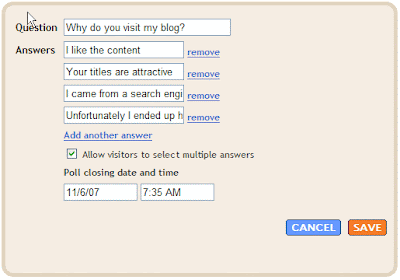
  8. Type in the question for your readers. Add the choices, one of which your readers will choose as answer. You could add more options by clicking on "Add another answer" or remove some options by clicking on "remove".


  9. By default, your reader can choose only one answer. If you want to allow your reader to choose multiple answers, then click the check box "Allow visitors to select multiple answers"


  10. You could set the closing date of the poll; the default is one week.


  11. Click on “Save”
You have just completed adding a poll to collect data/ responses from your readers. Please subscribe to my feed if you like this post.

Read more...

My Mortgage Experience

Monday, October 29, 2007


A decade ago, I was employed by one of the housing finance companies. I just recall how people would come to me without even knowing about mortgage. The access to information was restricted and the choices are limited.

What is Mortgage?
It is the method of using property as security to borrow money from a money-lending organization such as a bank or housing finance company or building society. By mortgaging, you are giving that organization the right to take possession of property if the loan is not repaid.
About five years ago, when I bought my first home, it was much easier. Now, the mortgage industry has revamped completely and people have too many choices. There have probably never been more household mortgage options available than there are in the present time. You need to make the right decision in choosing your mortgage plan and the lending organization. Here is where a Mortgage Broker can help you.

Who is a Mortgage Broker?
Mortgage broker is a person or an organization specializing in finding mortgages for those wishing to buy a property. A mortgage broker can search the market and find out which mortgage is the most appropriate, given your preferences.
Before you accept a mortgage plan, do your homework. Some of the items that you need to check:

  • Tenure of loan

  • Interest of loan

  • Fixed rate or Variable rate?

  • Is your principal adjusted monthly, quarterly or annually?

  • Do you need to produce any additional security?

  • Administrative, Technical or Legal fees to be paid

  • Will the organization impose penalty for early repayment?
Finally, ensure that the loan repayment terms fall within your budget. Do not bite off more than you can chew. The normal industry practice is to restrict your monthly instalment to about one-third of your take-home pay, if you do not have any other commitments. Choose the right plan and you will have a peaceful future in your sweet home.

This post is brought to you by Mortgage Broker

Read more...

Blogosphere This Week - Week No. 44/2007

Sunday, October 28, 2007

I have explained the importance of reading other blogs in many of my previous posts. To help you save some time in finding quality posts, I am introducing a new feature called Blogosphere This Week.

I will be listing here the most useful/ interesting posts that I came across during the week. The list will mainly cover topics like blogging tips, online money, blogger widgets and useful tools. For a start, I am looking at a list of about 10 posts. This quantity may change depending on the quality of the posts. I will be doing this every Monday, as a compilation of last week.

  1. Using Images in Your Posts: The Guide from SponsoredReviews Blog: A very useful post on the importance of images to posts. It also gives you tips and resources to extract images from the web and adding them to your posts


  2. 5 Special Reasons For You To Join A Blog Team from BloggingTips.com: Joining a blog team gives you much more exposure and experience that can help you in the long run. The author of this post explains why you should join a blog team and provides tips on how to join.


  3. What’s Your Story? Storytelling is Powerful Blogging from BloggingTips.com: This post explains writing posts from the perspective of story telling. Can be a powerful technique if used properly.


  4. 5 Essential Time Saving Tips For Bloggers from BloggingTips.com: A must read post for bloggers. In fact, I am following some of the tips already and found really effective.


  5. Using Google Analytics to Boost Traffic from BloggingTips.com: I have discussed earlier that you can increase your traffic if you properly analyse your statistics. This post reiterates that point with specific reference to Google Analytics


  6. 15 Things I’d Love to See Ad Networks and Affiliate Programs Do to Help Us Earn More Money Blogging from ProBlogger.net: Darren is a very experienced blogger when it comes to affiliate networks. Read his suggestions to some of the affiliate networks


  7. How To Make A Million Buck In a Week From Facebook from JohnChow.com: I am not a Facebook user. So, I did not read this post with much interest. Since it discusses about making some big money with Facebook, I have included it here. Explore it further if you are interested.


  8. Turning a Negative Into a Positive from JohnChow.com: The title of the post itself is a lesson. Most of the blogs discussed about Google PageRank this week. JohnChow writes about his view on the PageRank issue here.


  9. Building On Your Success from DailyBlogTips.com: This again is another post that highlights the importance of checking the right statistics for your blog. It gives you tips on how to analyze and use that information to our advantage.


  10. Click Comment: Cool Widget for Blogger from graphic-identity.blogspot.com: A cool widget you could try on your blog if you like it. It provides a simple way to get feedback from the readers who do not have time to write a comment.
Leave a comment if you find this new feature useful. Do check next Monday for another list of insightful posts from the blogosphere. Please subscribe to my feed if you like this post
Read more...

Great News: I got Google PageRank 2

Saturday, October 27, 2007

Great news to share with you! Yes, finally my blog is ranked by Google. The recent update shows my blog at a PageRank of 2. Not only this blog, two of my other blogs are also ranked at No. 2.


I am in a bit of celebration mood. This is one of the happiest moments in my blogging history. Thanks to everyone who have supported me by visiting my blog, subscribing to my feeds and linking to me. I think all those have worked in taking this blog to the next level.

Just to conlude, let me summarize my blog ranking as of today:
Google PageRank: 2/10
Alexa Traffic Rank: 1,247,119
Technorati Rank: 437,475
I am planning to write another post on why I think my blog is ranked by Google. Do visit again to find out the reasons. Please subscribe to my feed if you like this post
Read more...

8 mistakes to avoid in blogging

Friday, October 26, 2007

I thought of sharing some of my experience in reviewing various blogs over here. While the quality of the blogs varied a lot, one thing for sure is every blogger has the passion to blog. I think only this passion to blog has carried me this far and many other bloggers.

I always restrained from commenting on the content itself. My suggestions usually come from the viewpoint of the layout, arrangement of the page elements, navigational tools, text styles and similar. I had no intention to hurt any one in the review process and the whole intention is to improve the blog and bring in more traffic. I am happy that many of you have taken my comments positively. Here is my view on the common mistakes that should be avoided while blogging:

  1. Do not clutter the top portion of your blog completely with advertisements. I am not against placing advertisements. But, I personally feel that if you don’t sell your content to the readers you cannot sell your advertisement. Make sure when someone opens your blog, they can see at least a part of the content/ post.


  2. Do not expect your readers to scroll through the entire blog from top to bottom. Provide adequate navigational means for your readers. A simple list of recent posts or popular posts should help to keep them longer on your blog. The more they read, the better the chance for them to become your regular reader. A list of related posts just below each post would also help.


  3. Do not commit the mistake of not categorizing your posts. Always, include tags for each post. Keep the tags short, in one or two words. Try to keep the list of tags at an optimal level; about ten categories should be ideal.


  4. Do not use a standard template provided by your host. Look around for a template that looks professional and gives a better impression. Readers give better rating to blogs with a better looking template than a better written blog. If you do not want to spend, there are many free templates available.


  5. Do not use a different style for each of your posts. Use a consistent style for your font type, font size and font colour. I have seen bloggers using one colour for each post. This really doesn’t look nice. Do not use italic font for very long sections of text.


  6. Do not underline text, as readers would mistake underlined text as links. Use bold font or different colour to highlight a particular section, if really needed. Keep it minimal.


  7. Do not write long posts without any line breaks. Arrange your post into little paragraphs. Include sub-titles, wherever possible.


  8. Do not leave your blog un-posted for long durations. Update your blog regularly. Keep to a schedule and ensure that your posting frequency does not vary too much. If you are going on a long break, leave a note to your readers.
Just to conclude, I am not a great blogger myself. I am learning new tricks everyday. So, read other blogs and see what makes you to visit their blog regularly. Feel free to add your opinions on the topic as comments to this post.

Please subscribe to my feed if you like this post
Read more...

Can good titles bring in more traffic?

Wednesday, October 24, 2007

Recently, you might have noticed a new concept in blog advertising gaining momentum. I am referring to the use of widgets that display random links on your blog. While BlogRush widget displays the links to individual posts, the AutoRoll widget for blogger displays the links to your blog.

Which concept is going to be useful or successful? While I cannot forecast now, my vote goes to BlogRush concept. The reader’s attention goes to the widget for probably a fraction of a second. You need to grab his/ her attention within this split second. An attractive post title might do the trick rather than the title of the blog itself.

I have a feed on my blog that gets recent posts from the bloggers whom I admire. But, I do not read each and every post from them. The title is the key to me. If I like the title, I would explore further. As such, a good title for your post becomes very important.

What are the key components of a good title?

  1. There should be bait in the title (Title baiting?). In other words, there should be something that will attract the readers to click on the link.


  2. The title should be short and direct. BlogRush displays a maximum of about 42 characters from your title, including the blank spaces. In certain cases, depending on the first line break, it may even be lesser.

    For example, I have made $10,000 from my blog (Dreaming?) last month and would like to post about it. Think of a title “Last month, my blog helped me to make more than $10,000”. BlogRush will display the title as “Last month, my blog helped me to make mor…” See how your title has been curtailed by the widget. Now, let me think of another title “My blog made $10,000 last month”. In this case, the entire title will be displayed.

    So, plan your title and ensure that all your keywords appear in the first 30 characters or so.


  3. Include numbers in your title, if possible. It is understood that the titles with numbers attract more clicks. For example “7 easy ways to make money online”, “9 effective ways to get free money”, “5 proven methods to bring traffic” and something in that line.
If an attractive title can bring in traffic, why should I spend time in writing good content for my blog? Remember, good titles can bring in traffic. But, only good content can sustain the traffic.

If you would like to share your thoughts or your opinions on the above topic, please add your views in the comments section to make this a complete post. Please subscribe to my feed if you like this post.

Read more...

10,000+ blogs removed from BlogRush

Tuesday, October 23, 2007

John Reese, the founder of BlogRush, wrote to me (and, of course, to many other bloggers) that BlogRush is ready to roll out Phase 2 soon. He has indicated that those blogs that do not meet the requirement has been removed from the system. It is not very clear how the blogs had been evaluated. But, certainly, there is some clean-up as I had lost one of my referrals in the system.

While BlogRush promises an increase in click-rates, we need to wait and watch how it performs. The basic concept is really good as we can already see similar widgets being released like “What Others Say” widget for Wordpress and Autoroll widget for Blogger. But, the success lies in its implementation. I like John Reese’ commitment to BlogRush. I should appreciate his efforts in updating the members of the progress and replying to most the comments on his web site.

Here is a copy of the e-mail from John Reese for you to read:

An Important BlogRush News Update...

- Congratulations!
- 10,000+ Blogs Removed From BlogRush
- Phase 2 Being Deployed
- Busy Week Ahead!

-------------------------------------------------------------
Congratulations!
-------------------------------------------------------------

You are receiving this update because your blog has passed our strict Quality Guidelines and criteria -- we believe you have a high-quality blog and we are happy you're a member of our network!

-------------------------------------------------------------
10,000+ Blogs Removed From BlogRush
-------------------------------------------------------------

We've just completed a massive SWEEP of our entire network. We've removed over *10,000* blogs (Yes, ten thousand) that did not meet our new Quality Guidelines.

We have done a huge "quality control audit" of our network and have reviewed all the blogs one-at-a-time. We will continue to review each NEW blog that is ever submitted to our network.

You will notice the HUGE DIFFERENCE in the quality of blogs that now appear in your widget. This major *sweep* of our network will also increase the click-rates across the entire network and you will start to receive more traffic.

But we're only getting started. We've got LOTS of amazing improvements in the works to help you get more daily traffic from our network.

-------------------------------------------------------------
Phase 2 Being Deployed
-------------------------------------------------------------

We're in the process of rolling out our massive "Phase 2" upgrade to BlogRush. In the next few days you'll see an all-new Dashboard, advanced statistics reporting, and much, much more.

We're introducing tons of new sub-categories to help with content relevance (which will increase click-rates and traffic).

We're also introducing a "Thin Widget" option. Many of our members cannot use the standard widget because it's too wide for their blog. This new widget format will solve this issue.

-------------------------------------------------------------
Busy Week Ahead!
-------------------------------------------------------------

We have a busy week ahead as we will start rolling out all these fantastic changes. Thanks so much for your patience! We will continue to work very hard to help drive more quality, targeted DAILY TRAFFIC to your blog.

Best Regards,

John Reese, Founder of BlogRush

If you were one of the BlogRush members that had their account deactivated, you will notice that the widget no longer will load on your blog. For now, please remove the BlogRush code from your blog. When you login to your account you will find instructions on how to resubmit your blog for review to reactivate your account.

One thing is clear. BlogRush team did not expect such a huge response from the bloggers and they were caught unprepared. They should have, in fact, implemented the review process even before allowing anyone into the system. This reverse process is going to give some negative publicity for BlogRush and could cause irrevocable bitter feeling among the bloggers.

Please subscribe to my feed if you like this post

Read more...

What goes behind every successful event?


I like the concept of outsourcing. In simple terms, outsourcing is utilizing experts from outside the organization to perform specific tasks that were performed internally. Outsourcing has obvious benefits that include cost savings, improvement in quality, access to operational expertise and better risk management.

As we all know, many hours of careful planning and preparation goes behind every successful event. Audiovisual management is one of the toughest aspects of event management. The audiovisual and technical needs have to be well planned, integrated, and delivered at a reasonable price.

AudioVisual
AudioVisual Management Worldwide (AVMW) is one organization that offers audiovisual management and consulting. AVMW can help you with Event Management, PowerPoint development/ editing, Video production/ web casting, Audio Visual Consulting, Audience Response Systems and graphic design. AVMW’s website is simple, easy to use and gives much background on their services. Take time to browse their services and do not forget to request for a free quote for your upcoming event.

Employing such a specialist service not only saves you time and money; you are also getting more time to focus on other important aspects of the meeting.

Brought to you by AVMW

Read more...

My blog continues to grow in Alexa Ranking

Sunday, October 21, 2007

Last week, I brought to your notice the biggest jump in my Alexa rank. The blog has performed exceptionally well over the last one month. Buoyed by the sudden increase in traffic, the blog has jumped more than 2 million spots and reached a position of 1,409,859.

With the traffic staying consistent over the last week, I could hang on to the ranking. In fact, the ranking went up by about 100,000 spots. Alexa’s updated ranking shows my blog at 1,312,657.

It’s not going to be easy to move up from here, as the competition gets tougher. What am I going to do? Where do I go from here? Subscribe to my feed to keep you informed of my blog’s performance.

Read more...

Online selling made easy

Saturday, October 20, 2007


Selling online has never been so easy. Would you pay for a service that you have not tried hands-on? I would say no. But, if someone offers you a 10-day free trial to setup your online store to experience the flexibility and professionalism of the system, probably you would give a try.

Setting up a successful e-commerce site may be very complicated. But, Ashop makes it simple for you. Ashop Commerce is a world-class provider of ecommerce software, internet programming and digital imaging who supply toward small to medium sized businesses that are looking to build or simply start their online division of business.

Ashop offers a turn-key e-commerce solution for the future through an ASP built, secure, web based, hosted store building solution for setting up your online business. With no software to install, you can build and manage an online store from any computer in the world with only an internet connection. More importantly, there is no need to understand any HTML to use Ashop Commerce shopping cart software. You are provided with all the tools (e.g. WYSIWYG editor) to build or maintain your store. You could provide your customers with a complete real-time shipping solution and accept credit cards online.

To sell online, you need to maintain control over every aspect of your e-business: Stock control, customer relations, search engine promotions, sales reports and invoicing. Ashop Commerce is a professional ecommerce company specializing in shopping cart software development, providing a total solution to online selling.
This post is brought to you by Ashop Commerce

Read more...

7 Simple Steps to an Effective Post

Writing a post might look like an extremely easy task. But, if you don’t plan properly then it might just end up as a waste of time. A carefully written post might not attract visitors. But, a poorly written post certainly drives away your readers. So, I thought it is time to share some of my own experience and the knowledge acquired by reading some of the good blogs.

  1. Do not start writing immediately. Identify a topic you want to write about. Then, get your thoughts organized and run through the post in your mind.

  2. Do not use your blog’s editor to type the posts. Use your normal word processor like Microsoft Word. This will prevent you from other distractions and would help you to concentrate on the topic you are discussing.

  3. Ensure that you type at least about 100 to 150 words per post, organized in a minimum of two paragraphs. Anything less than that doesn’t look like a post.

  4. Do a spelling and grammar check. Use the Thesaurus to find out whether some of the words could be replaced with better synonyms.

  5. Open your blog’s editor now. Copy the post from your word processor and paste it.

  6. Preview your post before you publish it.

  7. Once you have published, visit your blog and ensure that the post looks as intended. If not, do the necessary corrections in your editor and republish it.

The above 7 steps might look very simple. But, if you practice this you will understand the difference. The quality of your posting would improve tremendously.

Read more...

Benefit from the blog advertising industry

Friday, October 19, 2007


Update on 05 Jan 09: I have stopped writing sponsored reviews and I do not recommend them on this blog any more

Blogsvertise Logo
The current trend in the industry is to get bloggers to write sponsored reviews of products, services or websites. With millions of blogs around, it is proven that blog advertising is an effective mode of marketing. While advertisers found it to be an economical and quick mode of reaching the customers, the bloggers found it an effective way to monetize their blogs.

In line with the growth of the blog advertising industry, Blogsvertise has setup a blog advertising service that helps bloggers and online journal writers to earn revenue from their online blog/journal in an easy to use, simple and effective system.

The better part is that you do not have to endorse the product/service that you are writing about. You can discuss it however you want, compliment it, review it, discuss how it relates to something going on recently or in the past in your life, or even complain about it. Your blog/entry should be at least 60-100 words and contain a minimum of three links.

Click Here to Advertise on My Blog

Read more...

Alexa Rank: My blog jumps up by 2 million spots

Thursday, October 18, 2007

Yes, that’s true. My blog has moved up to the position of 1,409,859 in the recent Alexa traffic rankings update. It is a jump close to 2 million spots from a position of about 3,600,000 yesterday. It is even sweeter when I recall that my blog was not among the rankings just about a month ago.

My Alexa Rank
Alexa’s traffic rank is based on three months of aggregated historical traffic data from millions of Alexa Toolbar users and is a combined measure of page views and number of users. The Alexa traffic rank is based on the geometric mean of these two quantities averaged over time (so that the rank of a site reflects both the number of users who visit that site as well as the number of pages on the site viewed by those users).

The rise in my blog ranking doesn’t really took me by surprise. I have expected this since my blog traffic has been consistent after the significant increase last month. I even expect my blog to break into the Top-One Million soon, as my one-week average is consistently hovering somewhere around the 500,000 to 800,000 mark.

In case if you are new to my blog and wondering how all these have happened, please read some of my popular posts below which would explain the reason:

Read more...

My blog is approved by Smorty

Wednesday, October 17, 2007


Update on 05 Jan 2009: I have stopped writing sponsored posts and I do not recommend them any more on this blog.


I have recently signed up with Smorty as a blogger. While one of my other blogs was approved instantly, AssessMyBlog was rejected. It is sometimes hard to understand the logic behind such a rejection. But, I think the reason being that AssessMyBlog is fairly new in the arena and the traffic is not that significant when I did apply.

In line with the increase in my blog traffic since last month, I expected Smorty to clear my application. As expected, today I received an e-mail from Smorty stating that my blog is approved. In case you do not know about Smorty, here is a quick preview:

About Smorty:
Smorty is a service that acts as a communication link between advertisers and bloggers. It helps advertisers to promote a product, service, company, blog or a web site. It provides a cost-effective solution to advertise on blogs. It provides a way for bloggers to monetize their blogs.

Advertise on blogs:
The advertisers get a chance to display their products through quality blogs. The blogs, which already have a good amount of readership, provide a quick way to reach a wide customer base. By advertising on blogs, the advertisers can build quality relevant inbound links to increase search engine rankings. No wonder, blog advertising is considered as one of the best advertising strategies available now.

Get paid for blogging:
Bloggers, like me, have worked hard to create an online existence. Now, this standing on the blogosphere can be used to some good effect. Smorty pays the bloggers to review the advertiser’s products. The blogger can express his/ her honest opinions/ thoughts on the product. Smorty does not enforce bloggers to write only positive reviews about the products.

Read more...

Blog Review: The Running Weblog

Sunday, October 14, 2007

+++++ +++++
Blog Title: The Running Weblog
Blog url: http://www.runweb.org/

A professional looking blog with a cool template. I am quite impressed with the site at the first glance. The site has limited advertisement that blends in nicely with the rest of the content.

This is fairly a new blog, active only since September 2007. The updates are regular. The site concentrates mainly on topics related to webmasters. I found the post Understanding Google Pagerank in Easy Way really useful and new piece of information to me. Take your time to browse through this blog and you will find more useful information.

I notice that there are no pictures in either the posting or the side bars. Adding some pictures to the blog would help to break the monotony and add some spice to the look.

Overall, it is a good looking blog and keep watching as this blog grows.

Read more...

Blog Review: Create Blog and Promote It

Saturday, October 13, 2007

+++++ +++++
Blog Title: Create Blog and Promote it
Blog url: http://kasakk.blogspot.com/

At first, I thought this is a classified advertisements page. No, it is a blog. There are too many advertisements and it makes very difficult to focus on any content in the blog. Please remember that if you do not have enough content, then you will not have visitors to read your advertisements.

I am happy that you have introduced many useful programs to make money online. Nowadays, it is easy to find out a list of programs to make money. But, if you can also write about your opinions/ thoughts or share your experience with such programs that might help the readers.

The blog is updated regularly, an average of about one post every week. The background for the main content as well as the sidebar looks good. Please use the justified alignment for the posts rather than the left alignment. Include a line spacing between paragraphs to make the post easily readable.

I note that you have not used labels to categorize the posts. You should implement this as this provides an useful means of navigation to the readers. If you need further information, you can read my post Why should I tag my posts? The blog archives are listed in chronological order. Change this to reverse chronological order so that you will have the recent posts expanded.

To conclude, I would advise the author to reduce the number of advertisements. Keep it at an optimal level. Concentrate on your posts and include your personal experiences with the various programmes you are promoting.

Read more...

Free Cartoons for your blog

'We Blog Cartoons' contains cartoons by Dave Walker which can be freely reused on other weblogs. The cartoons may be used on any personal blog. Blogs that make money via affiliate sales or advertising are included in this, but if you are looking for a cartoon for a company website then contact Dave for an individual quote.

Right now, the site has cartoons under several categories like Blogging, Christmas, Current Events, Environment and so on. Save the cartoon onto your own webspace and then post the cartoon on your blog, keeping the credit line and link as it is. Or… Simply copy and paste the code underneath the cartoon in question. Simple as that.

Cartoon by Dave Walker. Find more cartoons you can freely re-use on your blog at We Blog Cartoons.

Read more...

Simple steps to become a famous blogger

Thursday, October 11, 2007

Cartoon by Dave Walker. Find more cartoons you can freely re-use on your blog at We Blog Cartoons.


Do you think it is that simple? How good it would be if it is so simple? No, there are no short-cuts to become a famous blogger. Work hard, always learn and finally post smart. The famous bloggers out there in the cyberspace are not born overnight. They have worked their way up.

If you need some tips, I have shared my thoughts and opinions to go one level up in the blogosphere. Read some of my posts below, which might help you to fly in the right direction:

Read more...

Recent Comments Widget for Blogger

Earlier, I have written a post on how to install the Recent Posts widget for Blogger. In this post, you will see how to install the recent comments widget for Blogger. I have to accept that I am not a great fan of the recent comments widget. While I certainly favoured the installation of the recent posts widget to enhance the blog's navigation, I leave it to you to decide whether you need a widget for recent comments. I personally feel that it is not very useful unless you have lots of visitors who contribute regularly.

Blogger do not have a standard widget for you to include easily into your blog. But, don’t worry. There is a small work-around that would help you to install the recent comments widget on to your blog. The trick is to use the “Feed” page element provided by Blogger. You just have to get a feed from your own blog. Just follow the step-by-step tutorial below that should make things clear.


  1. Log in to your Blogger account

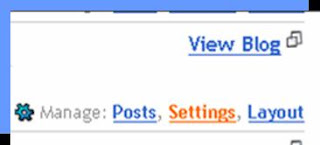
  2. On the dashboard, click on the “Settings” link


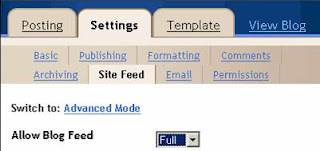
  3. On the Settings tab, click on the “Site Feed” tab


  4. Check the field “Allow Blog Feed”. Please select either “Full” or “Short” in the drop-down menu. You have to ensure that “None” is not selected

  5. Click “Save Settings” button at the bottom of the page


  6. Now, click on the “Template” tab. This will take you to the “Page Elements” tab


  7. Click on the “Add a Page Element” link at the section where you want to include the list of recent comments. You can include it in the sidebar or just below the post


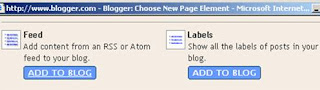
  8. In the Page Elements pop-up window, scroll down to find the page element “Feed”


  9. Click the “Add to Blog” button

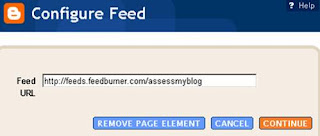
  10. Type the comments feed URL of your own blog, which should look like http://yourblogname.blogspot.com/feeds/comments/default/. Replace the text "yourblogname" accordingly for your blog.


  11. Click on “Continue”

  12. In the window that pops up, you can configure your feed. Type in a suitable title for your page element, like Recent Comments or Latest Comments

  13. Select the number of comments to be displayed. Blogger allows only a maximum of 5 items to be displayed

  14. You can choose to display the date of the comment and the author name if you want. You will see a preview of your feed in the box

  15. Click on “Save Changes”

That's it. You have added the list of recent comments.

Read more...

Increase in my blog traffic: Reason #3

Tuesday, October 9, 2007

This is in continuation of my previous posts on Increase in Blog Traffic: Reason #1, Reason #2 and Significant Increase in My Blog Traffic.

Read other blogs:
Schedule some of your daily time to read other blogs. You could choose to read blogs from popular bloggers like JohnChow or ProBlogger. Or you could choose to read blogs at random. I have included a RSS feed on my side bar that displays the five most recent posts from JohnChow.com, BloggingTips.com and ProBlogger.net. I make it a habit to go through these links daily and read those that attracts me.

How did it help me?
These blogs give me the broad picture of the latest trends in the blogosphere. Their posts had given me the starting point to write many of my own posts. I got the idea from these blogs to write some of my popular posts like How much is my blog worth? and 63/100: That is the grade of this blog.

I had been introduced to BlogRush by these bloggers. BlogRush has brought in some traffic for me. Even though the amount of visitors is not that significant, the BlogRush widget itself gave me lead to some wonderful posts. I like the concept of BlogRush that randomly displays posts from your own niche.

It is from other bloggers I learnt how important it is to provide different means of navigation to your readers. It prompted me to implement the Popular Posts widget, Recent Posts widget for Blogger, Related Posts widget for Blogger, list of categories and a list of archives on my blog. All these different means of navigational aids helped me to keep the visitors a little bit longer on my blog.

As an Indian proverb says “Learn from the mistakes of others; you don't live long enough to make them yourself”. So, read others blogs and learn from them. Your blog will certainly grow.

Read more...

Link Promotion: Give me a link and get back upto three


Update on 09/11/07: I will continue to encourage link exchange with blogs. But, I don't see much response for this promotion over the last one month. So, I am closing down the three-to-one link promotion. I will still be giving you a one-to-one link exchange. Thanks for your support.

I am announcing a link exchange promotion to enhance my Technorati ranking and to have a go at the Google page ranking. The concept is simple. Give me a link to this blog from your blog and I will give you back one link each from two of my other blogs (Singapore2India and Mahendra Singh Dhoni). Your blog can be on any subject.

If your blog is about blogging or online money or Blogger hacks or Blogger widgets or any similar topic, I will give you a bonus link from this blog itself. That makes it three links for one. But, I reserve the right to decide whether your blog is related to my niche to provide the third link.

What should you do?
  1. Provide a link to my blog http://assessmyblog.blogspot.com/ with any one of the following anchor text:
    • Blogger Widgets
    • Blogger Hacks
    • Blog Review
    • Blogging Tips
  2. You are also free to include a link to any of my posts with the same anchor text as my post title
  3. Leave a comment at this post with your blog's URL
  4. I will include the links to your blog within a day (except weekends) and will leave a comment at your blog
So, what you are waiting for? Go ahead and connect me by your links.

Cartoon by Dave Walker. Find more cartoons you can freely re-use on your blog at We Blog Cartoons.

Read more...

Improve your traffic with Traffic Analysis & Statistics packages

Monday, October 8, 2007

In one of my earlier discussions on the probable reasons for the increase in my blog traffic, I have pointed out the importance of understanding your blog traffic. It is not just enough to have a simple hit counter that counts the page impressions. You need a statistical package that gives you much more insight and knowledge of your traffic. Let me introduce some of the statistical packages that I have tried hands-on. These sites provide the basic packages absolutely free.

1. StatCounter.com: This is one of the best statistical packages available. It provides the basic information like page visits, unique visitors and returning visitors. It provides a list of popular pages, listed in the descending order. You could drill down each page to find out who referred this page to your visitor. It provides a list of entry pages and exit pages. Another important feature is the keyword analysis. Overall, it is a good package I would recommend you to sign up.

2. Google Analytics: This is the statistics package that comes from Google. It is an excellent package too. It gives you a dashboard to customize what reports you want to see on the front page. It provides all necessary information like page visits, unique visitors, returning visitors, where did the visitors come from, popular pages and so on.

3. SiteMeter.com: This is another popular package available for free. SiteMeter does not currently track Unique Visits/Visitors. One important feature here is it provides a traffic prediction based on your current traffic. This might be useful if you would like to market your site to your potential advertisers.

Each site is using a unique way to calculate the visits. So, the statistics provided by one site might not be identical with the statistics from another site. Regardless of the absolute numbers, the general trend should be similar. The details like where the visitors came from or the browser they are using should be similar. Depending on your requirements, you can sign up any of the above services. There might be restrictions on the free packages. But, the free services should be sufficient enough if you do not have very high traffic.

Read more...

Products that guys would love to get

Sunday, October 7, 2007


Car Guy GarageHave you ever thought of converting a garage into a room you’ll be proud to show-off? Did you ever face the anxiety of leaving your garage door open when your friends visit your house? No more worries.

CarGuyGarage.com offers the complete range of products for you to make the garage another room in your house. The products at CarGuyGarage are developed to add style, sophistication and strength through modern design to transform your old garage into a functional room of your house; a place to entertain family and friends, and work. If I would like to buy a gift to one of the guys, the gifts for him would be from the product range that includes garage storage cabinets, garage workbench, car lift, garage flooring, garage refrigerator and so on.

Remember, organizing your garage will add value and convenience to your home and make you the envy of the neighbourhood.

This post is brought to you by CarGuyGarage.com

Read more...

Increase in my blog traffic: Reason #2

Saturday, October 6, 2007

This is in continuation of my previous posts on Increase in my blog traffic: Reason #1 and Significant Increase in My Blog Traffic.

Do not hesitate to link to other blogs:
This is a golden rule. I had seen many bloggers who do not write about other blogs and hesitate to link to others posts. While you should not copy the contents of other blogs, you can always add your opinions/ thoughts about a particular post and link back to the original post.

How did it help me?
This technique has worked successfully for me. In one of my posts, I have written about my experience and shared my honest opinions about a service from another blog. Once again, this blog is one of the Top-100 Technorati sites, with a Google page rank of 5. The author of that blog took note of my post from the Technorati reactions and included a link to my blog at the sidebar of his home page.

It is a win-win situation for both of us. While his blog gets additional exposure through my post, I have got a link back from a blog with considerable traffic. This might not happen every time. But, why don’t you try your luck? If this trick clicks, you get that additional traffic. Even it fails, it doesn’t matter. After all, you have written a useful post for your readers.

Read more...

Increase in my blog traffic: Reason #1

Thursday, October 4, 2007

I have pointed out the increase in my blog traffic during September in my previous post Significant Increase in My Blog Traffic. I tried to analyze the statistics and figured out the probable reasons. I will present these in the next few posts. Here is the first one.

Know your blog traffic:
Until recently, I have not bothered to look at the statistics behind my blog traffic. The only thing that would interest me is the hit counter. I used to watch the counter, day in and day out, ticking slowly. You have to look into your traffic and mine the data for some useful information (a bit of data mining). Look at the visitors’ profile, where do they come from, the browser they are using, their click pattern and so on.

How did it help me?
I was surprised when I found that most of the visitors to my site came from a popular blog. This blog is one among the Top-100 Technorati sites. So, I took my time to visit this blog and tried to identify a link to my blog. After some time, I found that a link to one of my posts is sitting pretty comfortably at the sidebar. It did not take much time to identify that my link is part of an automatic widget, which pulled recent posts with certain keywords. To confirm this, I quickly wrote another post with the same keyword. As expected, I got another link to my blog displayed at this popular blog, which has about 20000+ incoming links.

No wonder I am getting some good traffic. Now, I would ensure that I always get a link from this blog by writing posts with similar keywords once in a while.

Follow the PDCA cycle (Plan, Do, Check, Act):

1. Plan what you want to write about:
Everyone of us search Google or Yahoo or MSN for some valuable information. Sometimes we get it straightaway, sometimes it takes a long route. If you are searching for a term and unable to find the required information quickly, then it is a good topic to write about. (Eg. It may be on Free CSS templates, Blogger templates, Recent posts widget, Blog Assessment tools or any topic from your own niche)

2. Do post about the topic:
After finding a good topic, write about it. Even if you don’t know anything personally, you can redirect your visitors to other sites. When you redirect, give your opinion on each site and how did you find it useful. Do not just include the links, you should have tried it hands-on.

3. Check the statistics:
Does this post bring in any traffic? Where do the visitors come from? Has this post been linked somewhere else? Filter out the information. You could use some of the free statistics packages like Google Analytics, SiteMeter or StatCounter.

4. Act on the information:
If the post brought some traffic, try to leverage on that. Work out your strategy on how to retain this traffic.

In case you did not get enough traffic, don’t worry. This is a trial-and-error procedure. Go back to the PDCA cycle again. I have more to write, but I will do it in the subsequent posts.

Read more...

Significant Increase in My Blog Traffic

Not long ago, I used to look at the statistics of my blog and ponder whether to continue blogging or not. To be honest, I started blogging more than a year ago. I did not achieve anything of significance from my first two blogs. This is my third blog and did not promise much until recently.

Suddenly, the blog is doing reasonably well. I am getting visitors from all around the globe and my blog is popping up in the search engine results. My blog has appeared in the front page for some of the keyword searches in Google.

The recent statistics is shown in the graph below:

Blog Traffic Statistics Graph
As you can see, the blog was really inactive in July. In August, there was little traffic, but still negligible. But, in September, the traffic really looked up and the traffic has really been on the rise since then. You could notice that there are ups and down on a daily basis, but on an average it is growing. I am getting close to about 100 visits per day on average.

Having seen the sudden rise, I have asked myself "Why?". How this could have happened? While I won't know the exact answer, I have figured out the probable reasons. I will follow up, in the next few posts, with what could have caused this rise in traffic. Until then, keep your fingers crossed.

Read more...

My first milestone: 50 Posts

Wednesday, October 3, 2007

50 Posts on my blog

Just wanted to tell you that I have completed 50 posts recently in this blog. Not a great number, but gives me a sense of achievement. I started this blog somewhere in May 2007 and achieved this feat in September 2007.

Its really a long time, about 5 months, to complete 50 posts. But, as I look back, I started this blog only to divert some of my off-topic posts from my main blog. As time went by, I saw the potential of this blog and diverted my attention to this blog. As you can see, my bulk of the posting started somewhere in end August and no looking back. In fact, I have almost sacrificed my other blogs to concentrate on this blog.

This blog was started mainly as a blog review site. A total of 21 posts out of the 50 posts was devoted to free blog reviews. I have also shared some useful tools with the readers and gave tips on some Blogger widgets/ Blogger hacks/ Blogger enhancements, however you want to call it.

Enjoy these little moments of achievements and that will give you the strength to go further up. I would like to express my sincere appreciation to all the readers who have supported me so far. I need your support to go further!

Read more...

Wonderful gifts for the holiday season

Monday, October 1, 2007


The holiday season is just a few months away! First Halloween, then Thanksgiving, and before you know it, you'll be stuffing stockings! Don't worry, CouponChief is here for you. CouponChief.com is a wholly owned subsidiary of Coupon Chief, Inc. Coupon Chief strives hard to provide a one stop coupons deal and discount resource for their Web site visitors. The focus is on customer support and providing up to date coupon codes and promotional deals and discounts that is unparalleled in the online shopping e-commerce industry.

Make a wish list of your household family members and think of the most amazing gift you would buy for them, if you could. You can consider Paragon Gifts Coupons. For more than 25 years, The Paragon Gifts, Inc. has provided consumers with unique and exciting assortments of special occasion, collectible and seasonal giftware. They have built their reputation on introducing quality merchandise supported by a commitment to customer satisfaction and an unconditional guarantee.

Don't forget the pets! Consider PETsMART Coupons. PETsMART, Inc., is the nation's leading retail supplier of products, services and solutions for the lifetime needs of pets. The company operates more than 700 pet superstores in the United States and Canada as well as a large pet supply catalogue business, and the internet's leading pet product website.

Life is to live. Express your love with the wonderful gifts from CouponChief.com

Read more...

Is PageRank the best way to measure the success of a blog?

In my earlier posts How much is my blog worth? and 63/100: That is the grade of this blog, I have discussed the importance of evaluating blogs based on some systematic approach. This would avoid the controversies and discussions about who is the best out there.

While PageRank is used predominantly as one of the measures, I had seen some excellent blogs with a PageRank zero. One such example would be BloggingTips.com. I have enjoyed the tips and tricks from BloggingTips.com, but surprised to learn about the PR status. PageRank, in a way, favours older blogs and it is not dynamic enough to reflect day-to-day changes.

Today, I got a lead to one of the posts written at Courtneytuttle.com (thanks to the little BlogRush widget). The author expresses similar sentiment as mine and has written an interesting article How do you measure your blog’s success? He compares the strengths and weaknesses of PageRank, Technorati Rankings, Alexa Rankings and RSS count. Take a look at the article and you will appreciate the discussion.

Read more...

  © Free Blogger Templates Columnus by Ourblogtemplates.com 2008

Back to TOP